
No More Two-Screen Days: How M-Files Workspaces Puts Critical Business Information in One Place
The Cost of Working Across Multiple Screens
Most knowledge workers start a task already behind. Before any real work begins, there is a document system to open, an email inbox to check for the right attachment, and perhaps a shared drive to track down last month's report. One task, several systems, and time lost just getting your bearings.
This adds up across a team:
- Time spent reconstructing context every time you switch between systems
- Information duplicated across email, folders and other tools with no single place to see it all
- Staff relying on memory, or a colleague, to know where a document actually lives
- Extra clicks and delays that compound every day
We have written before about this problem in Ending the Digital Scavenger Hunt. M-Files Workspaces takes this further. Rather than simply making documents easier to find, it brings the documents, people and records connected to a piece of work into one place from the outset.
What are M-Files Workspaces?
Workspaces is a new layer within the M-Files platform, built around a simple idea: people don't start their day thinking about a folder. They think about a project, a client, or a contract they need to progress.
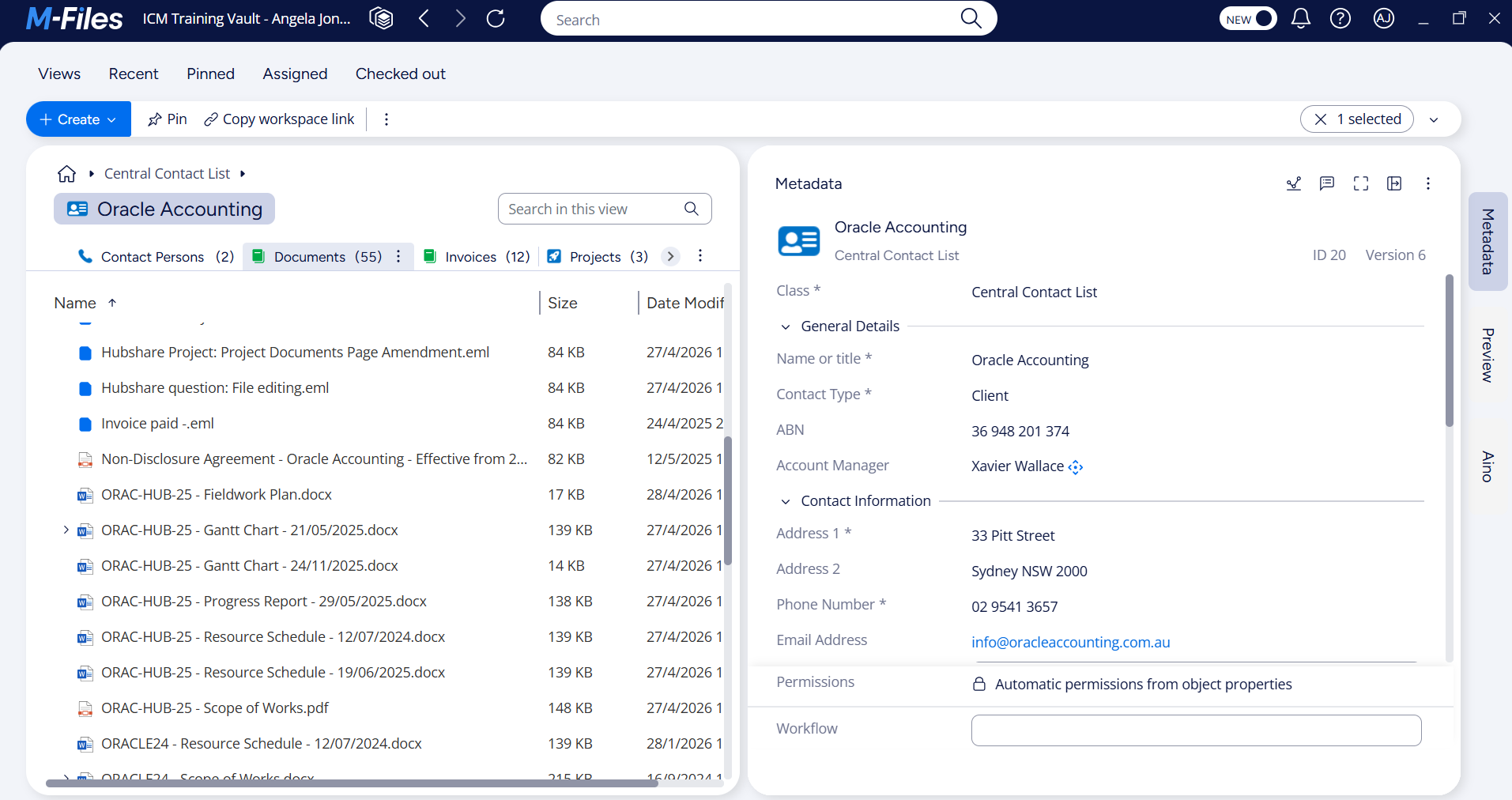
Instead of navigating a folder tree, an M-Files Workspace opens a single screen built around that project, client or contract, showing everything connected to it, including the relevant documents, their approval status, the people involved, and a complete history of how the work has progressed. All fully customisable.
Seeing it in Action: A Contract Management Workspace
To show what this looks like in practice, the M-Files Workspace example below is taken from a demo M-Files contract management vault built by our team.
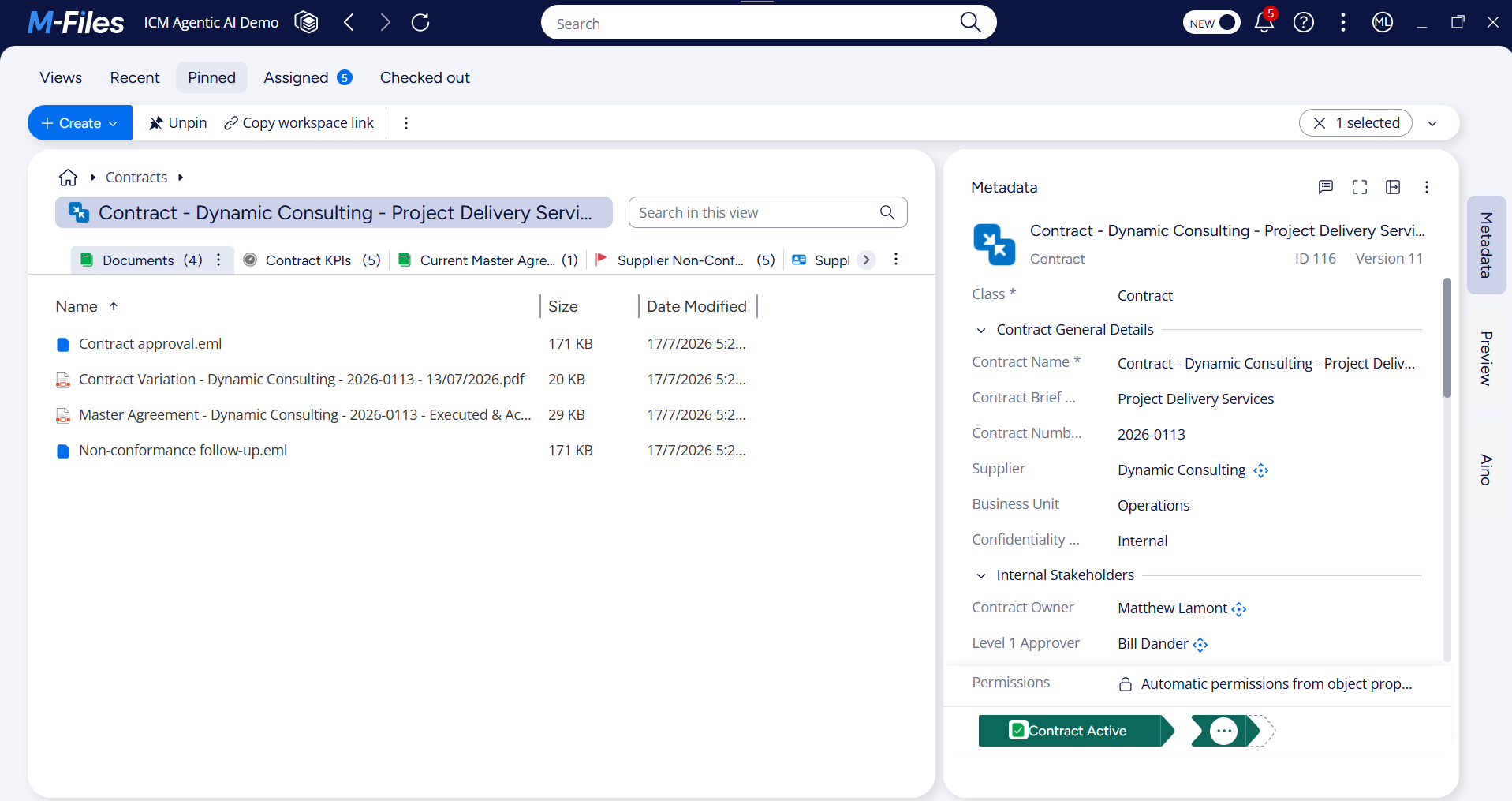
Opening a single contract record, such as the "Dynamic Consulting - Project Delivery Services" contract shown above, brings up everything connected to it in one screen:
- The contract's key details (supplier, business unit, value, start and expiry dates) in the metadata panel
- All related documents, including the executed master agreement, contract variations, and approval correspondence
- Related records such as contract KPIs and the supplier itself, each just a click away
- The contract's current status, shown clearly as "Contract Active"
There is no folder to search through and no need to remember where the executed agreement was saved. It is all attached to the contract itself.
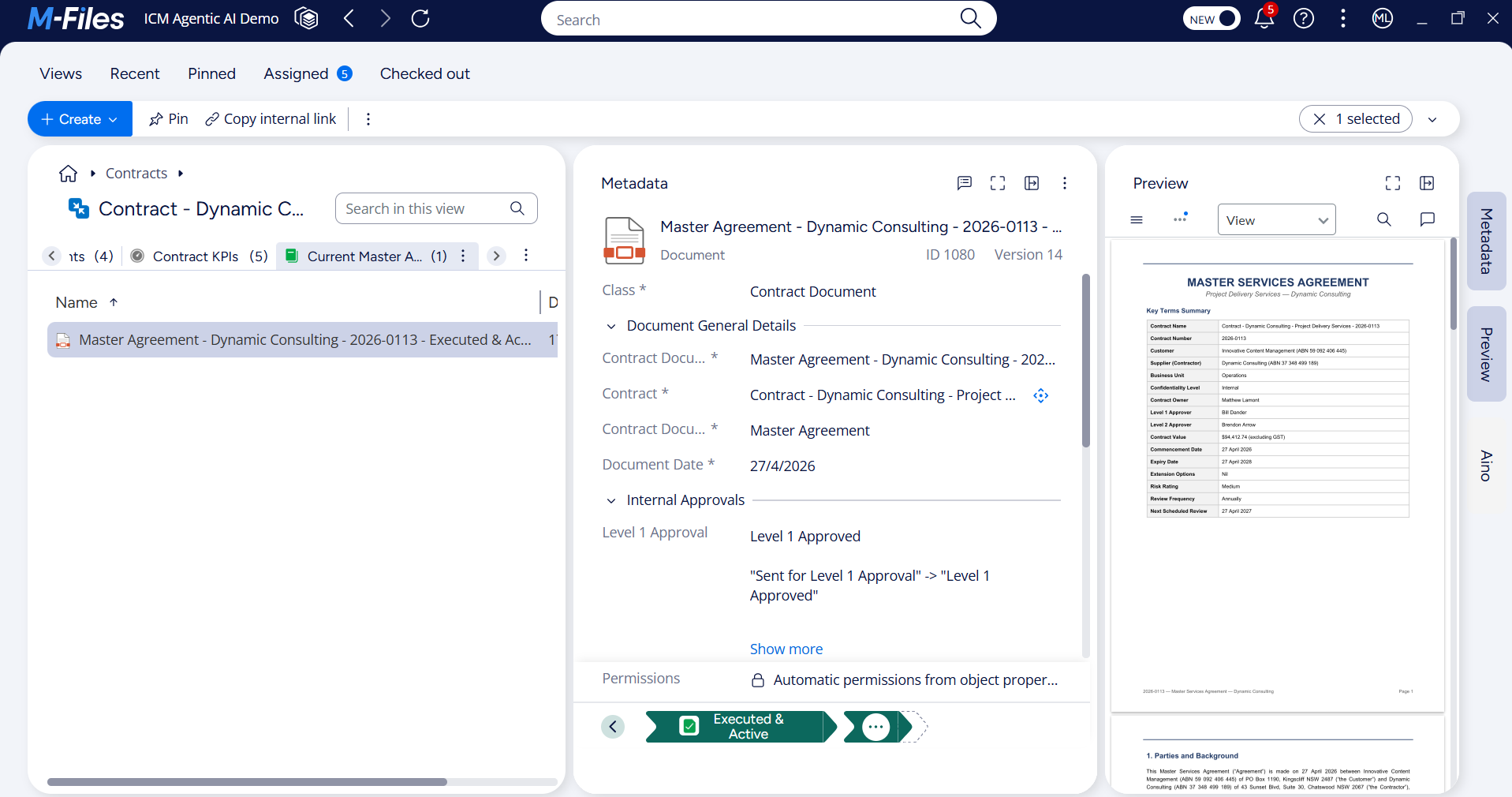
Opening the master agreement document from within the workspace shows a similar level of context. This Workspace is configured to display the contract's current, approved Master Agreement document. The document metadata panel records the full internal approval trail, including who approved each stage and when, while the document preview surfaces a key terms summary (contract value, expiry date, review frequency) without needing to search through the document itself.
Beyond Just Documents
Most document and collaboration platforms are still, at their core, file-based. Documents are stored, tagged, and grouped into a shared space, which is a genuine improvement over a plain folder, but the underlying model hasn't really changed: information is still a file, with some extra metadata or comments attached.
According to M-Files' own product leadership, this is exactly where most competing "workspace" features fall short. They are still, in essence, shared folders with metadata layered on top. M-Files Workspaces is built on a different foundation, the same metadata-driven, context-first architecture that has underpinned the platform from the start, one where information doesn't need to be a file at all to have a place in the system. It is common for some data, such as customer or supplier information, to be pushed into M-Files from an integrated CRM or ERP platform.
Not Just Files: Records That Exist Without a Document Behind Them
This is the part of Workspaces that is easy to miss, and it's the real difference between M-Files and a shared-folder-with-tags approach. In M-Files, something like a supplier, a contact, or a contract can exist as an object in its own right, with its own metadata, approvals and relationships, whether or not there is a document attached to it at all.
Look back at the Suppliers and Contract KPIs tabs in the screenshots above. Neither is a document. There is no file to open behind them. They are structured records, sitting in the same workspace as the actual files (the executed agreement, the correspondence), equally accessible and equally connected to the contract.
Most competing platforms, including well-established document management systems, are still built around the file as the basic unit, with context wrapped around it. M-Files starts from the other direction: the business record, whether that's a contract, a supplier or a client, comes first, and documents are simply some of the things attached to it. It's not a distinction every competing platform makes, and it's what allows a single M-Files workspace to show a complete picture, not just a well-organised pile of files.
Key Benefits for Your Organisation
- Faster access to what matters. Starting from a project or client, rather than a search bar or folder tree, means less time looking for information.
- One screen, not several. Fewer tabs, fewer logins, less time reconstructing context after every interruption. No need to switch back to your ERP screen to see client or supplier information.
- Audit and compliance ready. Approvals, related documents and correspondence are already assembled, with a clear trail of who did what and when.
- Consistent on-premises or in the cloud. The same experience either way, useful for organisations partway through a cloud migration.
- A stronger foundation for AI. M-Files' AI capabilities, including its Aino AI assistant, rely on understanding the relationships between documents and processes, which Workspaces keeps organised and connected.
Workspaces reflects something we've long believed about document management: information rarely exists in isolation. It belongs to a project, a client relationship, or in this case, a contract, and it isn't always a document either. The more clearly a system can show those connections, whether they involve a file or not, the less time your team spends piecing them together manually.
See M-Files Workspaces in Action with Innovative Content Management Today!
As an experienced M-Files Delivery Partner, the team at Innovative Content Management can show you M-Files Workspaces in action and help you understand what it would look like for your organisation. Book a free consultation today to find out more.
More Articles



Share