
Ending the Digital Scavenger Hunt: How M-Files Makes Finding Documents Effortless
Introduction
Knowledge workers often waste significant time searching for necessary documents. Traditional folder-based systems can become disorganised, leading to lost productivity, duplicated efforts, and user frustration. Research shows that many employees waste hours each week struggling to find documents and may even recreate them due to ineffective systems. It is essential for knowledge workers to focus on their core responsibilities rather than being bogged down by inefficient document retrieval processes.
Fortunately, modern information management platforms such as M-Files offer intelligent features that revolutionise information management, significantly reducing search times and improving overall efficiency. Here's how M-Files empowers users to locate documents quickly and accurately:
1. Instant Results with Quick Search
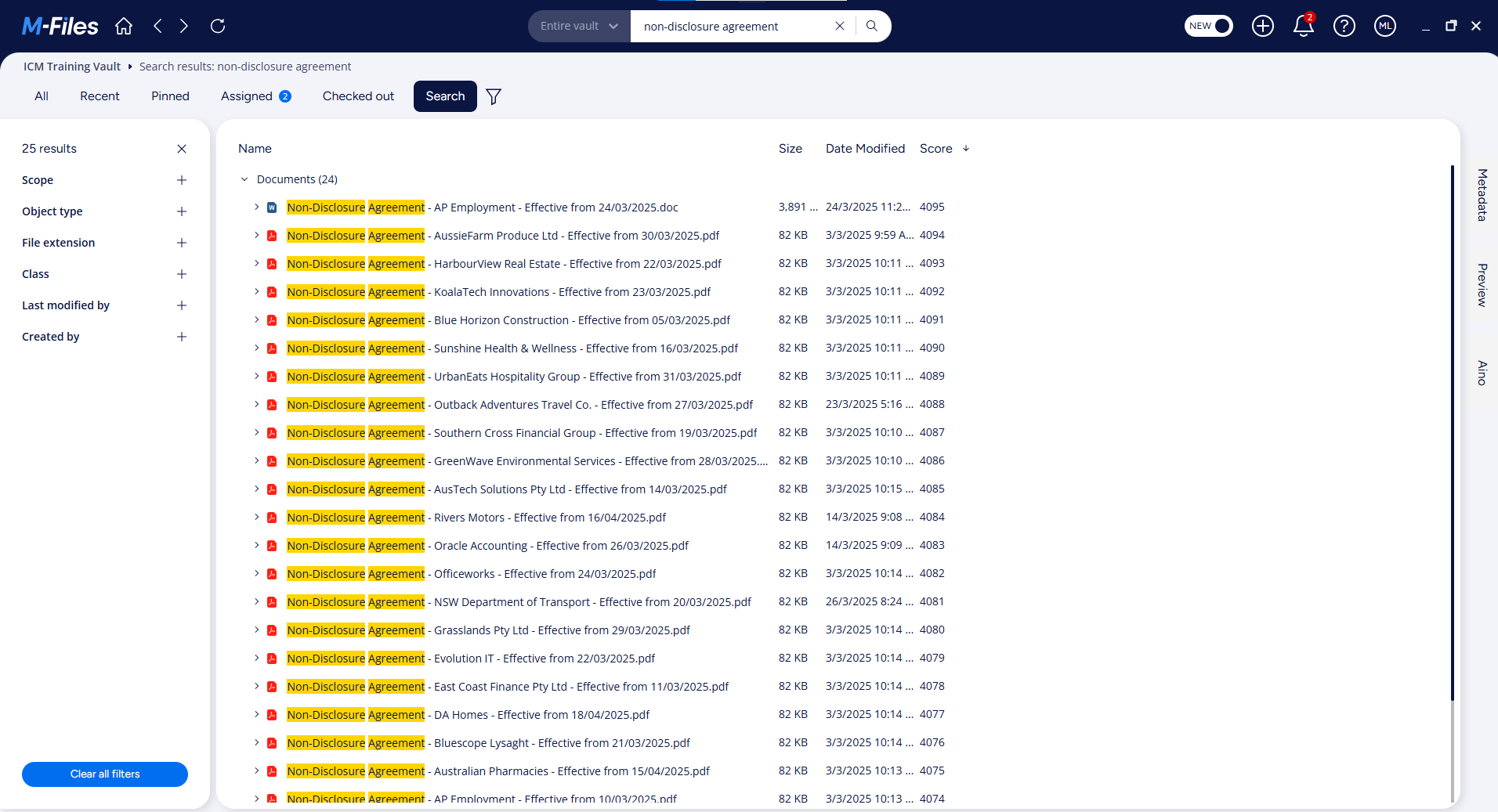
M-Files provides a user-friendly search bar for performing quick searches across the entire document vault. Users simply enter keywords or phrases to search both document metadata and file content. M-Files remembers recent searches for even faster access. You can also refine your search to focus on metadata or content specifically. In the example below, a search for 'non-disclosure agreement' has returned all matching results within seconds! This Google-like search functionality prioritises the most relevant results, saving considerable time.
2. Precision Finding with Metadata-Driven Search
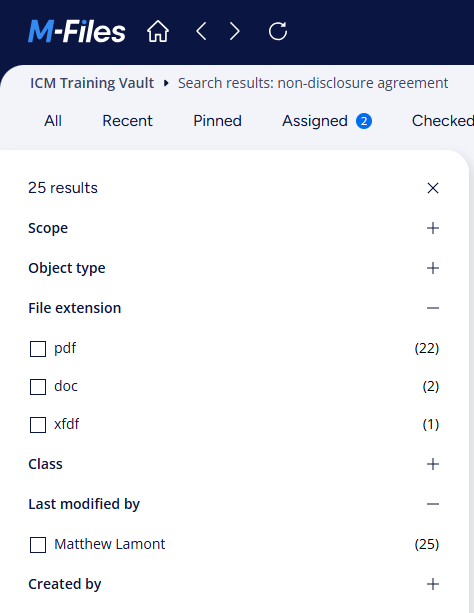
When a general search isn't enough, M-Files allows for advanced searches based on document metadata. Every object in M-Files can be tagged with relevant properties like client, project, date, and document type. By combining these properties in your search criteria, you can precisely locate the required information. For example, find all "contracts" related to "Acme Corp." created in "December 2024." As visible in the image below, you can even filter your searches by file type (.pdf, .docx, .msg) and date last modified to narrow search results down.
3. Organise Information Your Way with Dynamic Views
Unlike traditional folder structures, M-Files uses dynamic views to organise documents based on their metadata, creating virtual folders in real-time. You can create views that automatically group and categorise documents by properties relevant to your tasks, such as grouping by "Document Type" and then by "Status" (e.g., drafting, under review, approved). These views are like saved searches with a defined structure, providing quick access to information arranged according to your needs. Views do not duplicate files, instead they offer different perspectives on the same content. Therefore it is virtually impossible to open an out-of-date version of a document in M-Files. See M-Files views in action with our demo video below!
4. Discover Related Information Through M-Files Related Objects
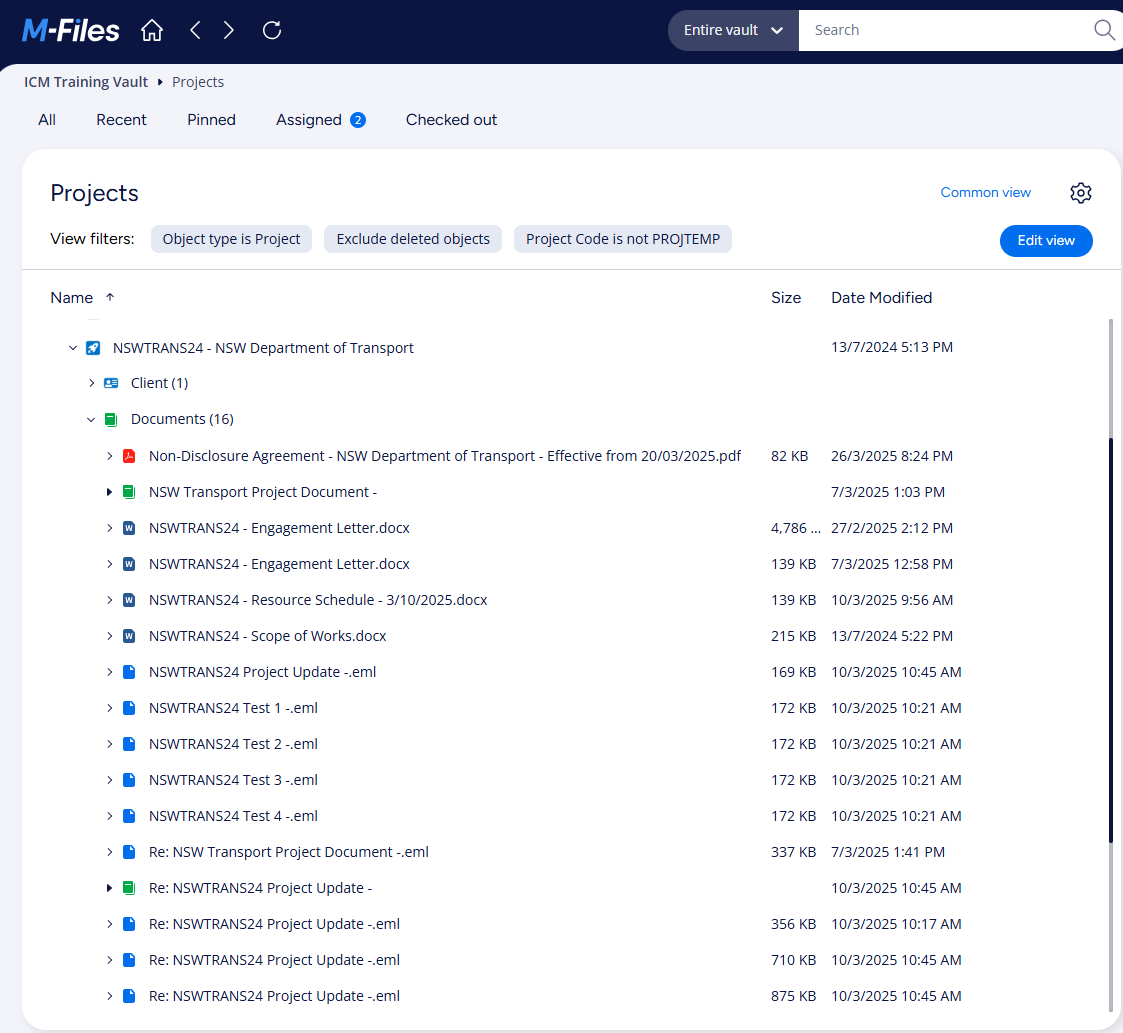
Affectionately known in M-Files speak as the '360° view', M-Files enables you to establish relationships between different objects, such as linking a client to all associated proposals, contracts, and communications. This interconnectedness allows you to easily find all related documentation by navigating to a connected object. For instance, in the image below the user has expanded a project in the M-Files application enabling them to instantly see all linked documents, emails, and contacts for the project. This eliminates the need to remember specific file locations and significantly speeds up information searching.
5. The Single Source of Truth for All Documents
M-Files can integrate seamlessly with existing document repositories including network folders and Microsoft SharePoint. Instead of requiring data migration, M-Files connects to these repositories, applying its metadata layer without altering the existing structure. This transforms M-Files into a single source of truth for all your organisation’s documents. Users can then use M-Files' powerful search and organisational tools to find documents regardless of where they are physically stored, eliminating the need to search across multiple systems.
By leveraging these intelligent features, M-Files dramatically reduces the time knowledge workers spend searching for documents. This recovered time can be redirected towards more productive activities, ultimately enhancing overall efficiency and reducing business risks associated with poor document management.
Sounds Interesting? How About a Free Trial of M-Files?
As an experienced and trusted M-Files Delivery Partner, the team at Innovative Content Management can arrange a no-obligation, 30 day free trial of M-Files so you can experience this magnificent platform for yourself. Reach out to us today to find out more.
More Articles



Share