Document Management Software for Australian Organisations, Ready for Microsoft 365 Copilot
Faster document search, automatic version control, full audit trail

Document management solutions since 2002

M-FIles
The only DMS built to live inside Microsoft 365
M-Files harnesses the power of metadata to categorise and classify documents based on what they are, not where they are stored. With M-Files, problems with folder-based filing systems are a thing of the past.
M-Files is the only document management platform on the market offering native content storage within the Microsoft 365 environment. This unique collaboration offers unrivalled data security and integration with Microsoft 365 applications, including Microsoft Copilot.
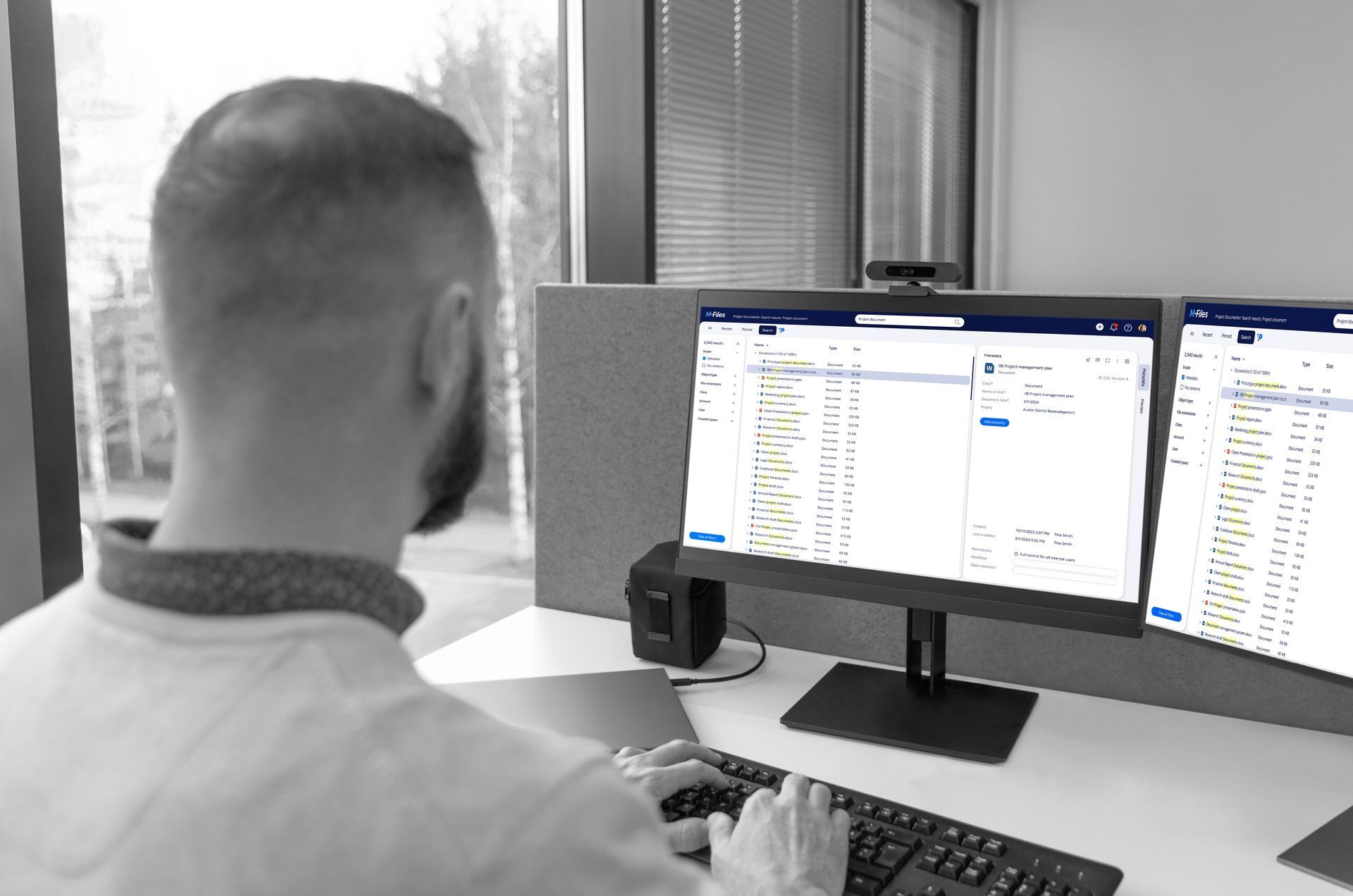
Free your documents from a single fixed folder structure
Folder-based systems ask you to decide on one folder structure up front. Level 1 might be by client, Level 2 by year, then Level 3 by document type. Everyone who uses that system afterwards has to work within it, whether it fits their role or not.
M-Files works differently because it doesn't store documents in folders at all. Every document carries metadata describing what it is: which client, which project, what type of document, its current status.
Folders only let you choose one home for a document, under the client, the project, or the financial year, never all three. M-Files removes that trade-off. The same contract can appear in the client's record, the project file, the responsible sales manager's view, and the relevant financial year, all at once, without a single duplicate copy sitting somewhere else.
If your team is feeling trapped by a folder structure that doesn't work for everyone, M-Files delivers a flexible platform configurable to make everyone happy.

The correct version.
Every time
M-Files uses metadata to manage documents, which means that it does not rely on the file name or location to identify the correct version of a document. With M-Files you can be confident knowing you are accessing the latest version, every time.
No more duplicates
By doing away with folder locations, M-Files eliminates the temptation to save the same file multiple times in different locations. M-Files automatically saves a new version of a document each time a document is checked in after editing, without creating another copy.
Complete version history
M-Files version history allows you to keep track of the changes made to your documents. A document’s version history is fully tracked in M-Files. Users can easily compare, label, comment, and roll back to previous versions of a document.
Customisable security
With M-Files, you control who can see and use documents through a fully customisable permissions framework. M-Files permissions can be automated, reducing the effort needed to control sensitive enterprise information.
The only DMS platform offering native integration with Microsoft 365
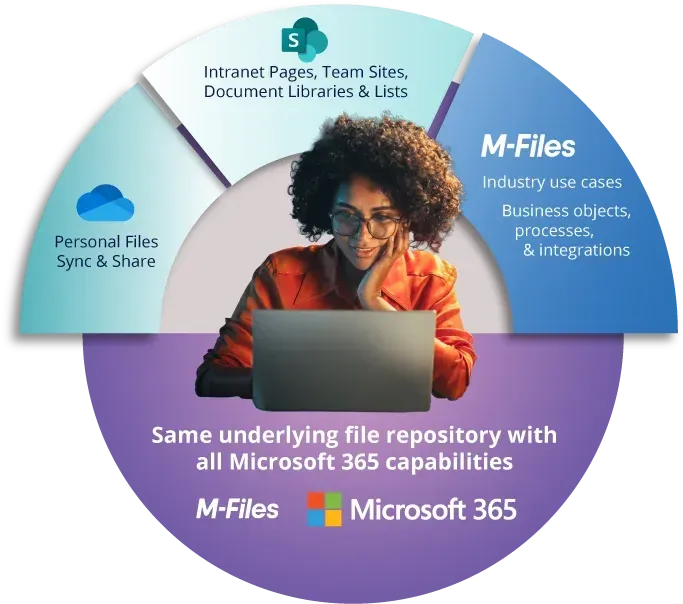
M-Files is the first enterprise content platform to natively store content within the Microsoft 365 environment.
This partnership between Microsoft and M-Files delivers a comprehensive document management solution without compromise:
- All the benefits of M-Files' proven metadata document control and search capabilities.
- Secure content storage within Microsoft 365 cloud infrastructure.
- Powerful integration between M-Files and Microsoft 365 applications.
- Seamless document co-authoring within Microsoft 365 applications such as Word and Excel.
- Being AI-ready with Microsoft Copilot and M-Files Aino.
Now your organisation can benefit from M-Files' state-of-the-art document management platform without compromising on Microsoft 365 capabilities previously only available in OneDrive and SharePoint.
Unprecedented benefits
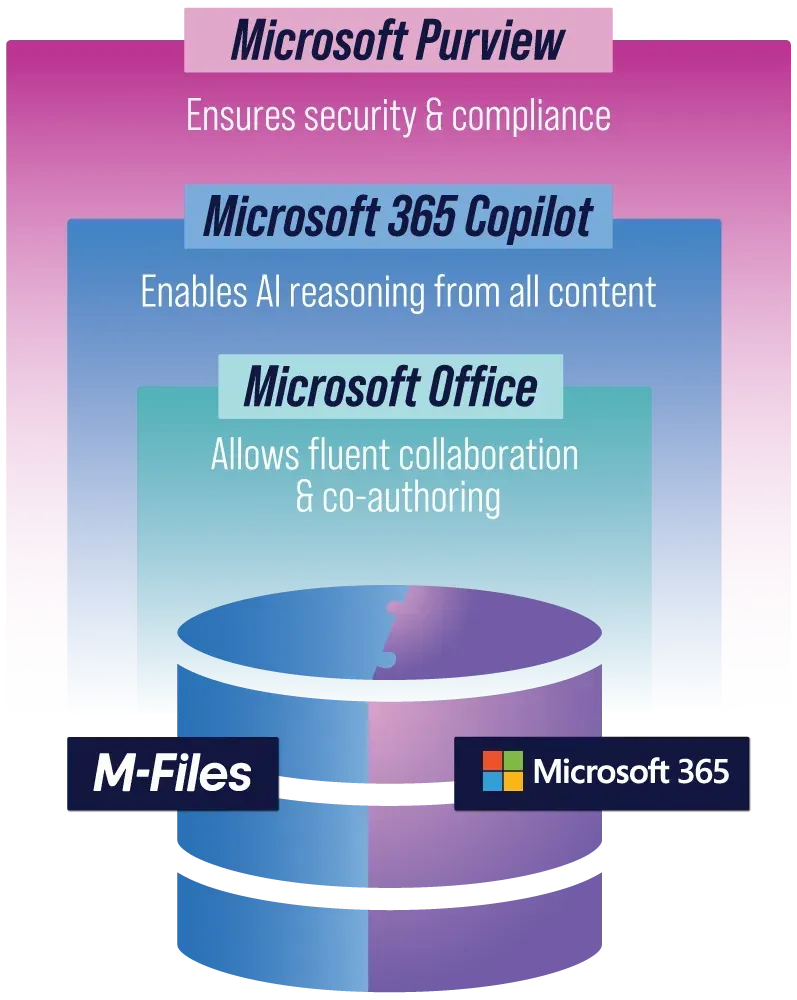
The M-Files Cloud now uses SharePoint Embedded to natively store your content directly within your Microsoft 365 environment, rather than a separate repository. Here's what it means for you:
Trustworthy AI-generated results
M-Files works smoothly with Microsoft 365 to organise and label important business content. Microsoft Copilot leverages M-Files metadata attached to your documents, producing higher quality outputs.
Work better together
Teams can work on the same document at the same time - no more waiting or version confusion. With M-Files and Microsoft 365 working together, co-authoring is smooth and simple.
Stronger security and compliance
All files stored in M-Files stay protected within Microsoft 365’s security systems. On top of that, organisations can apply their own rules and compliance settings using Microsoft Purview.
Get more value from your tech stack
Businesses can now use a top-tier document management system like M-Files without giving up Microsoft functionalities. This means no need for expensive custom solutions and the ability to benefit from future improvements from both M-Files and Microsoft.
Automate business processes with M-Files workflows
Workflow automation isn't an add-on to M-Files, it's core to almost every solution we deliver. M-Files' workflow engine lets you define the exact states and transitions a document or task moves through, draft, review, approval, rejection, finalisation, and automates the notifications, task assignments and metadata updates that happen at each step. No coding required.
This is where M-Files separates itself from file storage tools like SharePoint, network drives, Google Drive and Dropbox, tools often mistaken for document management systems.
File storage platforms can store a file safely and some even bolt on an approval flag or comment thread, but none have a genuine workflow engine, defined states, rules for who moves a document between them, and automation that fires at each transition. Without that, 'workflow' is just people remembering to email the next person.
With M-Files, business processes are enforced by the system, by design. The real difference between file storage and a dedicated document management platform.

WORKFLOW - no coding required
M-Files workflow automation

Clearly define business processes
M-Files powerful workflow engine helps streamline your routine tasks, improve efficiency and accuracy, reduce business risk, and enhance collaboration. Define different states and transitions of your documents, projects, or tasks, such as draft, review, approval, rejection, finalisation.

Automate workflow tasks
Leave application approved? Automatically notify the employee using M-Files notifications. M-Files workflows feature automatic notifications, reminders and actions for each workflow state transition, such as sending an email, creating a task, or updating metadata.

Reduce manual effort. Increase accuracy
Manual data entry can lead to mistakes, inconsistent work quality, and financial losses for a business. M-Files workflows help reduce tedious manual tasks such as filling out forms, signing documents by hand and manually uploading them. Automate other manual tasks with M-Files workflows such as converting documents and setting permissions, and sending notifications.

Route to the correct person. Every time
Assign roles and responsibilities to different users or groups for each workflow state, such as who can edit, approve, or reject a document. M-Files workflows automates task allocation, reducing reliance on email to assign tasks.

Stay informed
Monitor the progress of workflows using graphical reports and dashboards. View the current state and history of any document or object in the workflow. M-Files workflows allows users to monitor who is responsible for the document, what actions are available, and what has been done so far.

Reduce costs
Ever been charged an invoice late payment fee due to a missed payment deadline? Workflow automation can help your business grow and scale by saving time and resources that would otherwise be spent on manual and repetitive tasks. Automation helps your business avoid missing important deadlines and expiration dates, saving on unnecessary costs.
"Transitioning to M-Files reduced the average time for processing financial approvals from several hours or even a full day under the old paper-based system to as little as 10 minutes. This improvement is due to digital workflows, streamlined document sharing, and reduced reliance on email attachments. This reflects a significant efficiency gain and suggests broader operational time savings across LHAAC."
Ryan Janes | Coordinator
Local Health Authorities Analytical Committee
information visibility
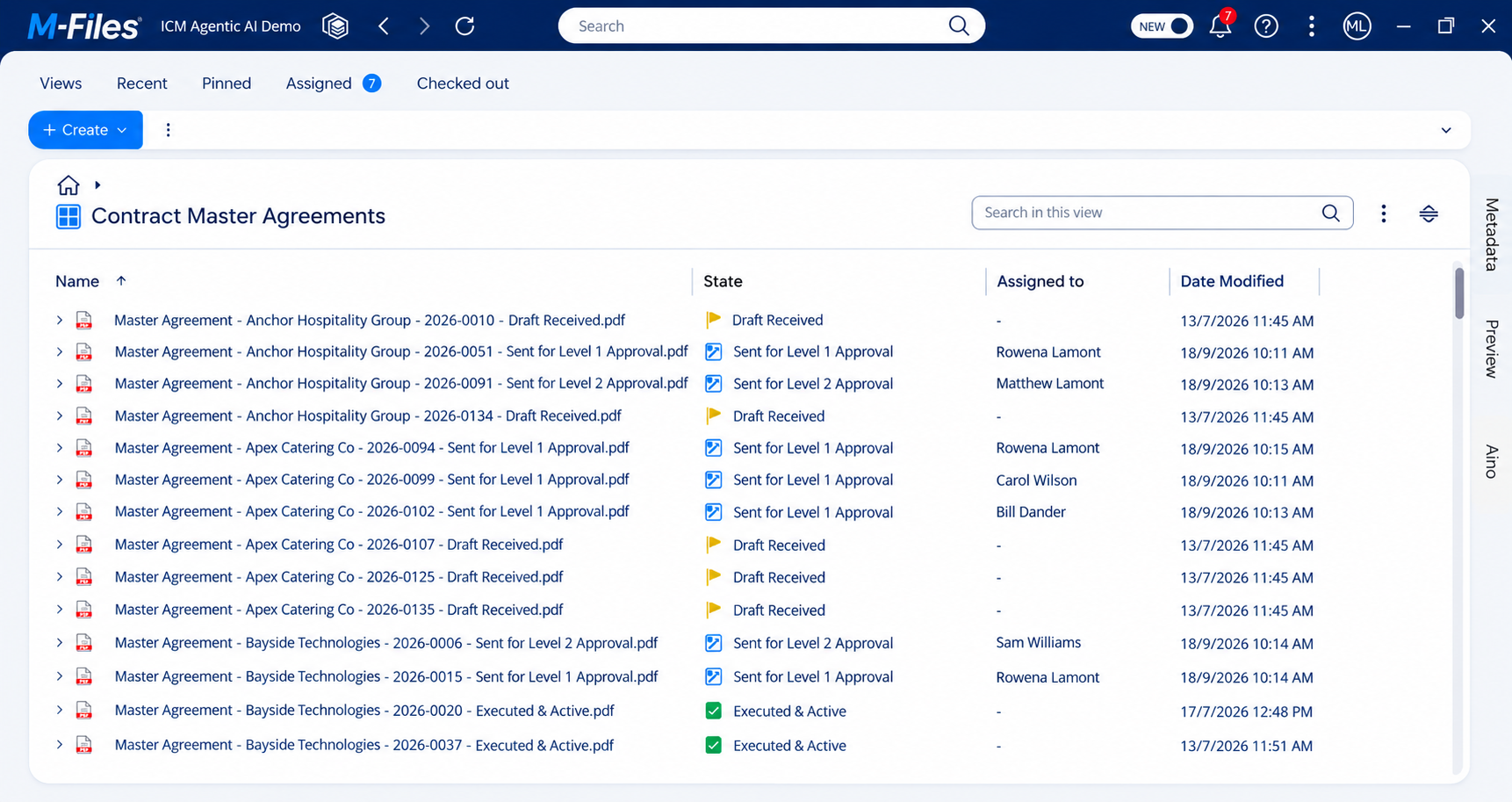
See where every document is, and who's holding it up
Workflow automation only tells half the story unless you can also see it happening.
M-Files gives every user a live dashboard view of where their documents and tasks currently sit: in draft, under review, awaiting approval, or finalised, along with exactly who it's currently assigned to for action.
Automatic notifications keep the right people informed at every step, without anyone needing to chase an update by phone or email.
- Personal dashboards show every document or task a user is involved in, and its current status, at a glance
- See at a glance who a document is currently assigned to, so follow-ups go to the right person the first time
- Automatic notifications alert approvers the moment something needs their attention, and alert requesters the moment it moves
- Full audit history of every state change, who actioned it and when, useful for both compliance and everyday record keeping
document access permissions made easy
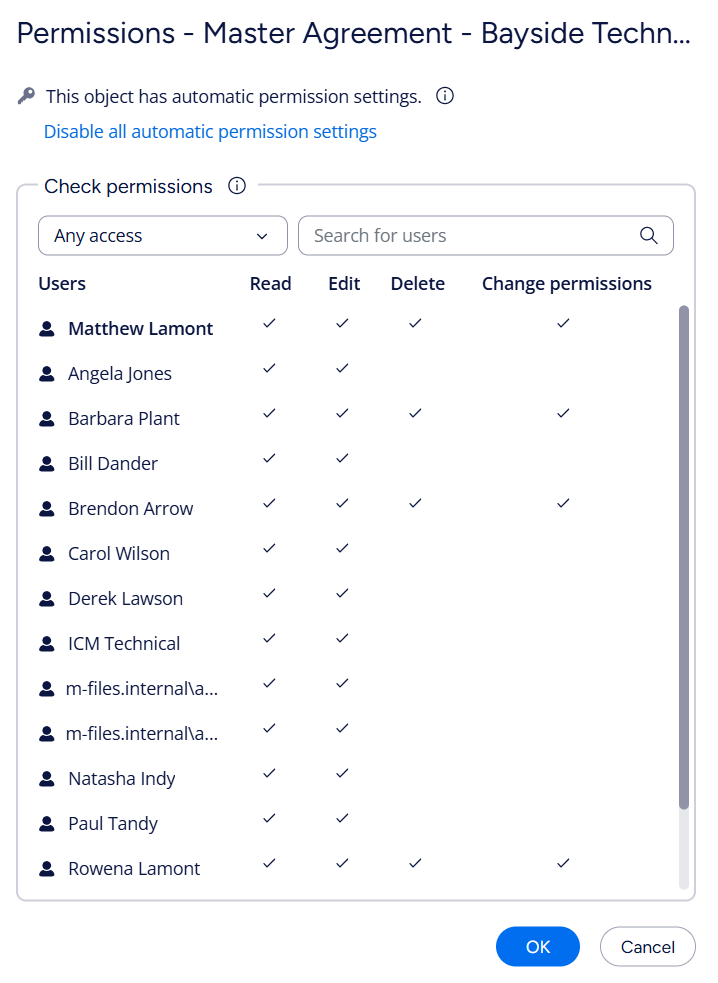
See exactly who can access each document
Permissions in M-Files are assigned by metadata, not by where a document has been saved. Tag something as a board paper, a contract or client correspondence, and the right access rules apply automatically, based on what the document is and who it relates to.
A permissions panel for each document is one click away showing exactly who has access and at what level. No guessing, no support ticket to IT.
- No manual setup per folder or site. Permissions are defined by what a document is, and according to your business rules. There's nothing to reconfigure every time a new project or client folder is created.
- Contextual, granular access. Only the contract administrators tagged to a specific contract can open it, rather than an entire department having blanket access.
- Permissions can tighten automatically as a document moves through a workflow, for example locking it from further edits the moment it's formally approved.
SharePoint and network drives work the opposite way: permissions are set per site, library or folder using membership groups that have to be manually configured and maintained every time a new folder is created. Someone has to remember to set it up correctly, and remember to update it when things change. M-Files doesn't rely on anyone remembering. The rule is attached to what the document is, so it's already correct the moment the document is filed.
INTEGRATIONS
M-Files easily integrates with your Microsoft applications
M-Files integrates with Microsoft 365 applications to help you manage your data and documents more efficiently and securely.
M-Files integration with Microsoft allows you to:

Save documents into M-Files directly from Microsoft 365 applications such as Outlook, Word, Excel, and PowerPoint.
Access your M-Files vault and view, edit, and share documents directly within Microsoft Teams.
Search for content stored in M-Files directly from Microsoft Teams, making it easier to find the information you need.
Leverage the security and reliability of Microsoft 365 and Microsoft Azure by storing your enterprise content in M-Files Cloud.
Does my organisation need a document management system?
A document management system (DMS) is a crucial tool for modern organisations seeking competitive advantage. Such systems are also referred to as electronic document management systems (EDMS or DMS) or content management systems (CMS). All are digital systems used to store, share, track, and manage files or documents.
M-Files is the market leader in document management systems. Implementing M-Files will deliver instantaneous benefits that enhance efficiency, collaboration, and compliance. Here are compelling reasons why your business will benefit from an M-Files DMS:
Centralised Document Storage:
M-Files provides a centralised repository for all your documents, making it easier to organise, search, and retrieve information. No more scattered files across network folders or filing cabinets.
Improved Collaboration:
M-Files Collaborative features allow your teams to work together seamlessly through features such as
document co-authoring and M-Files external collaboration platform, Hubshare.
Enhanced Access Security:
M-Files offers robust security features, including access controls, encryption, and audit trails to protect sensitive information and
prevent unauthorised access.
Version Control:
Keep track of document versions effortlessly with M-Files. Avoid confusion caused by outdated files and
ensure everyone works with the latest version.
Compliance and Legal Requirements:
Many industries have
strict compliance regulations. M-Files helps you meet these requirements by maintaining accurate records and ensuring proper document handling.

Robust Data Security:
M-Files Cloud solutions are hosted within secure Microsoft Azure infrastructure in Australian data centres. Data is fully encrypted at rest and in transit. M-Files Cloud is fully-compliant with a range of internationally-recognised security certifications such as ISO 27001, GDPR and HIPAA.
Efficient Workflow Automation:
Automate repetitive tasks with M-Files such as approvals, notifications, and document routing. Boost productivity and reduce manual effort.
Disaster Recovery and Backup:
M-Files offers comprehensive backup and disaster recovery features. Safeguard critical documents and business information against data loss.
Reduced Paper Usage:
Transitioning to digital documents with M-Files reduces paper waste and contributes to environmental sustainability.
Audit Trails and Accountability:
With M-Files, track who has accessed, modified, or shared a document. Maintain an audit trail for transparency and accountability.
Scalability:
As your organisation grows, M-Files can scale to accommodate increased document volumes. No need to worry about physical storage limitations.
50%
Improved searching for documents and information by 50%.
+65%
Faster filing of documents by 65%.
+100%
100% faster document generation, improve accuracy, and are easily generated from applications such as Microsoft Word.
Our clients
Our M-Files solutions are trusted by our clients