
M-Files Generative AI: Powered by Microsoft 365 Copilot and M-Files Aino
One governed foundation, two ways to leverage AI: Microsoft 365 Copilot and M-Files Aino. Both security-trimmed to what each person is allowed to see.

Document management solutions since 2002

native microsoft 365 copilot
Copilot that works like it's native, because it is
Most AI 'integrations' with a document management platform work through a connector: a bridge that lets Copilot peek into a separate system from the outside, usually with a delay, a synced copy, and a second permission model to keep in step with the first.
M-Files doesn't need a connector. Because M-Files content is stored natively within Microsoft 365, Copilot experiences it exactly the way it experiences a file that's always lived in SharePoint or OneDrive. No lag, no sync, no gap for permissions to drift out of step.
A file sitting in plain SharePoint or OneDrive is still just a file: a name, a folder path, maybe a few manually applied tags if someone remembered to add them. A document in M-Files carries its full metadata: what it is, who it's for, what customer or project it relates to, what workflow state it's in, and what approvals it's already been through. Copilot can read all of that structure, not just the words on the page, so its answers are grounded in the same business context your team already relies on, not just a keyword match.
For any organisation running a document management platform other than M-Files who wants to deploy Copilot with confidence, M-Files is the benchmark to measure against. If your content still relies on a connector, a synced copy, or a permission model bolted on top of Microsoft 365 rather than built into it, you're accepting a version of Copilot that knows less about your content, and trusts it less, than the M-Files version does.
unrivalled productivity
Put Copilot to work in your DMS
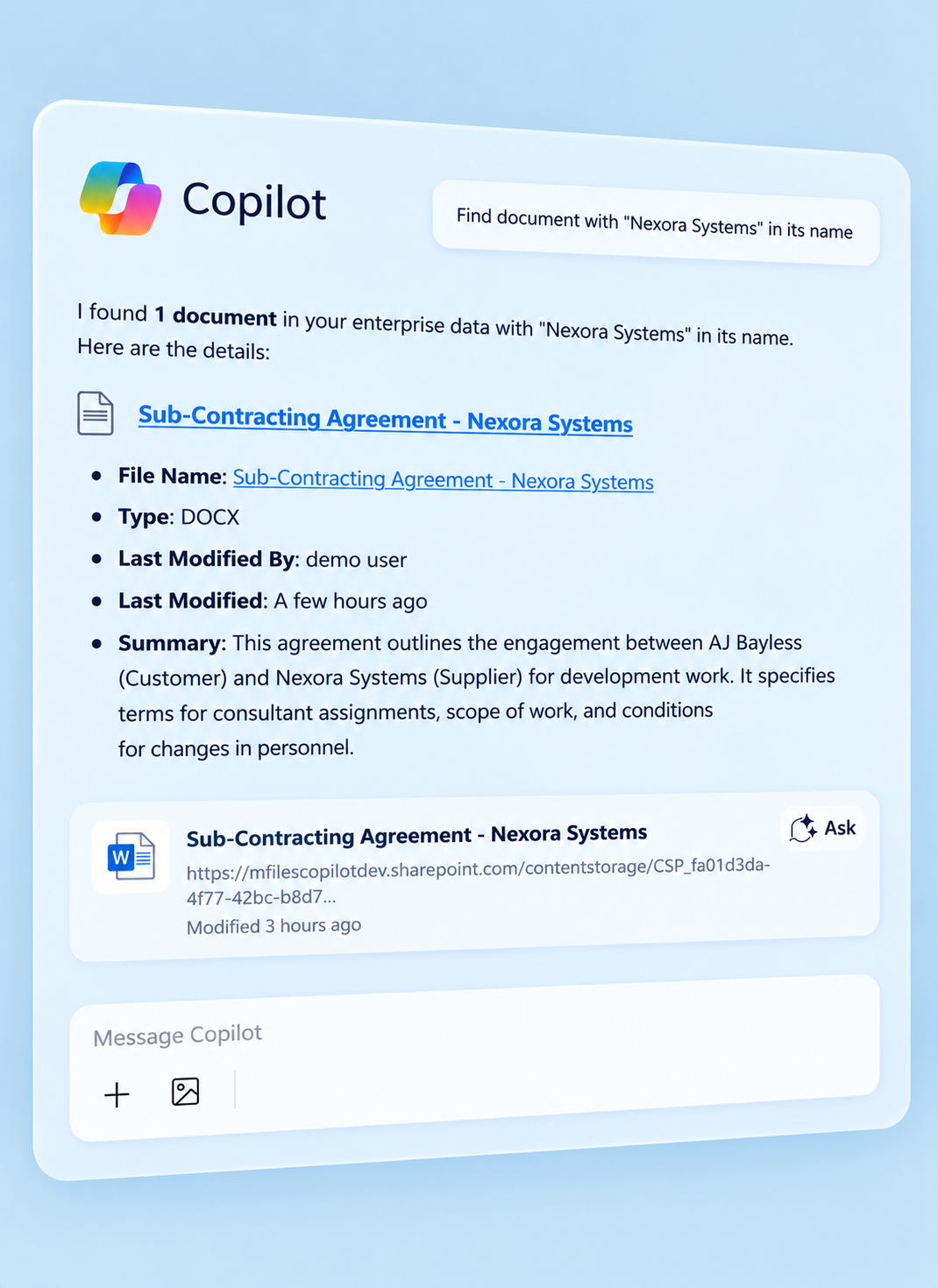
Because Copilot draws on the same governed content your team already trusts, it delivers a level of productivity no bolt-on AI connector can match.
Ask Copilot to:

Draft a contract variation or policy update, pulling the customer, project or clause history straight from the document's M-Files metadata, not guessed from surrounding text.
Summarise everything relevant to a client, project or audit, drawing on the full set of documents that M-Files metadata connects it to, not just a shared folder.
Catch up on approvals in seconds, ask what's still waiting on your sign-off or what changed since you last reviewed a document.
Pull together everything for a client meeting, the current contract, latest report and outstanding actions, assembled from correctly filed, permission-checked content.
m-files aino generative ai
Beyond Copilot: AI that lives in your M-Files vault
Not every team runs on Microsoft 365 Copilot. M-Files Aino doesn't need it to. M-Files Aino goes further, working natively inside the M-Files vault itself, with no Copilot licence required.
- Design customised tasks that run throughout M-Files workflows
- Ask Aino a question about a single contract
- Have Aino suggest metadata the moment a document is saved
- Query across your entire M-Files vault at once, all answered from your actual content, with every answer cited back to its source.
M-Files Custom Agents
Automates judgement-based workflow steps using natural-language prompts, e.g. checking an invoice against contract terms and routing for approval.
M-Files Metadata Agent at Scale
Enriches metadata across large volumes of existing content in the background, no user interaction needed, ideal for migrations and legacy archives.
M-Files Aino ("I know")
Ask a question in your own words and get trusted, cited answers drawn from knowledge your organisation has already captured in M-Files.
M-Files Metadata Agent
Analyses new documents and suggests metadata, supplier, type, expiry dates and more, ready to accept in one click.
m-files custom agents
When you need AI to act, not just answer
Copilot and Aino answer questions. M-Files Custom Agents goes a step further, working within M-Files workflows. A document or metadata object hits a workflow step, a custom agent can begin reasoning against rules and related information in the M-Files vault that you define in natural language, no code required.
The possibilities with M-Files Custom Agents are limitless. Here's some examples:
- Verify subcontractor invoices against a contract, checking rates and line items automatically and routing only genuine discrepancies to a human approver, with the findings already assembled.
- Score vendor risk on every review cycle, pulling non-conformances, contract status and certification expiry straight from the M-Files vault so no vendor is ever skipped because a reviewer ran out of time.
- Check incoming inspection sheets against the product spec, accepting in-tolerance batches automatically and flagging only genuine deviations for review.
- Create and assign follow-up tasks straight from a document, with every AI-generated value badged, explainable on click, and preserved in version history.
m-files AINO
Get instant answers from your documents
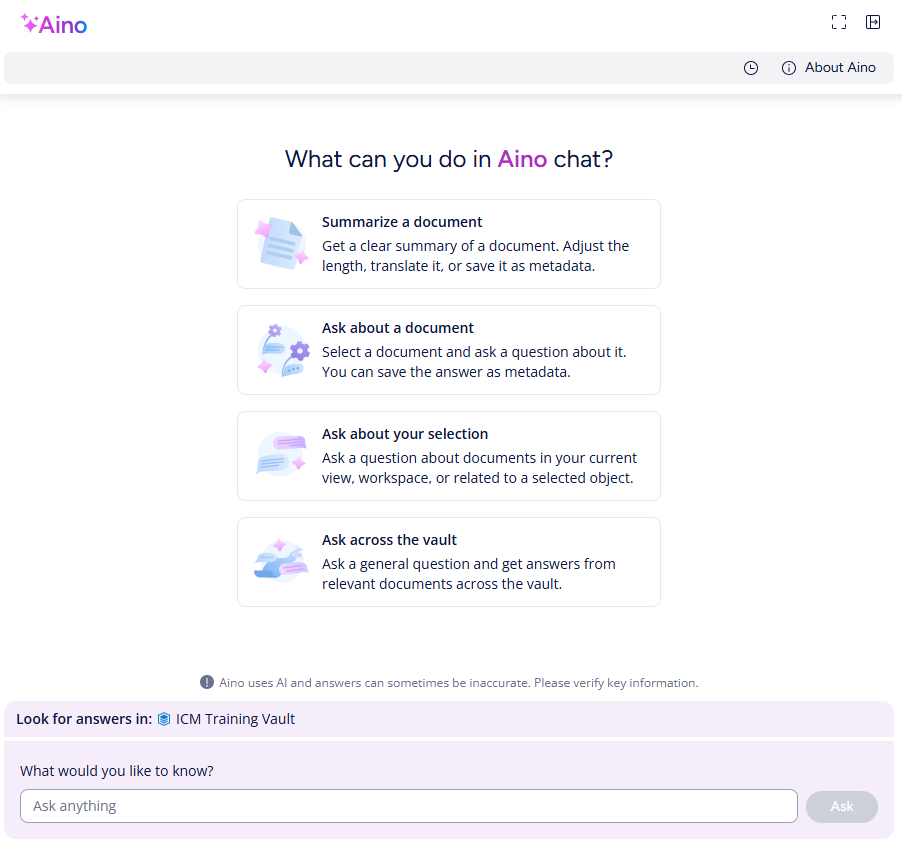
Stop wasting time manually reading through lengthy documents to find specific details. With M-Files Aino, you can interact with individual documents using natural language prompts. Aino can rapidly summarise complex documents, answer specific questions about their content, translate text, and extract key information on demand.
Instead of spending precious time manually scanning pages, Aino gives you the information you need in seconds. This accelerates document review, analysis, and comprehension significantly.
Take these examples:
- Contract Review: Instead of reading a 50-page contract, simply ask Aino: "What are the payment terms?" or "Summarise the key obligations for [Our Company Name]". Get precise answers without the manual search.
- Meeting Minutes Analysis:
Quickly understand outcomes without reading the full transcript. Ask Aino:
"What were the main action items assigned during the project sync meeting on Tuesday?" or
"Who is responsible for updating the budget forecast?"
m-files aino metadata agent
File smarter, not harder
Accurate metadata is crucial for findability, workflows, and compliance in M-Files. But populating metadata manually can be tedious and prone to human error. Aino Assisted Metadata Filing radically transforms this process.
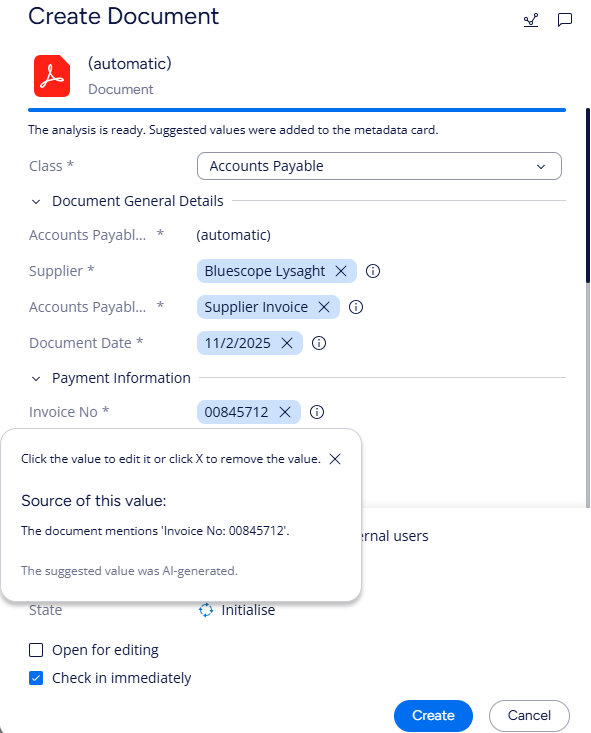
When you save a new document, Aino analyses its content and automatically suggests relevant metadata properties and values. It can identify document types, extract dates, link to customers or projects in your M-Files vault, and much more.
Aino Assisted Metadata Filing drastically reduces manual data entry during the filing process. It not only saves time but also significantly improves the quality and consistency of your metadata, making information easier for everyone to find and use later.
Take this example: Drag an invoice into M-Files. Aino automatically reads the document and identifies it as an invoice. Aino then suggests metadata such as: Invoice Number: INV-12345, Customer: ABC Corp, Due Date: 2025-05-15, Total Amount: $5,800. You just review and click 'Create'. Easy!
drive automation, save time
Leverage AI-generated metadata to drive automation
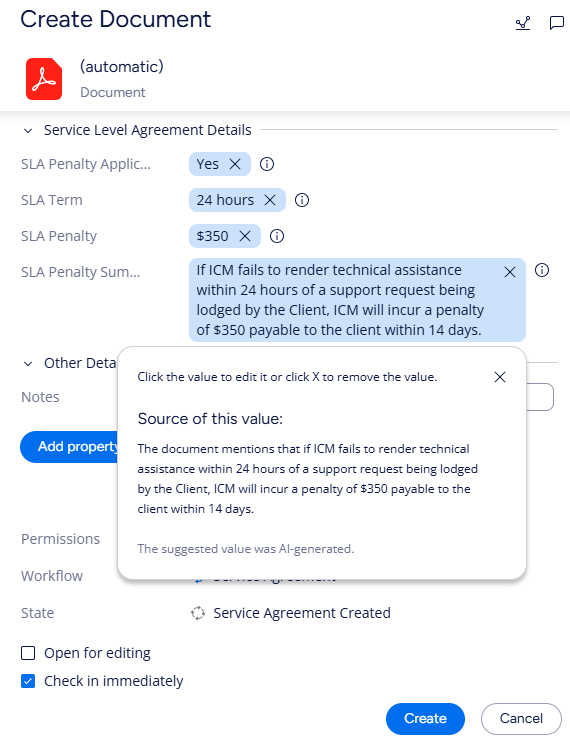
M-Files' Aino Metadata Agent opens up a new world of opportunity to drive process automation for your organisation. Aino not only extracts information directly from documents such as names, dates and amounts, it can also generate more complex metadata that can be combined with M-Files automation features such as workflows.
Take this example:
- Compensation payable for non-performance: An IT business offers a service level agreement (SLA) clause as part of its service agreement contracts. The business must provide technical support when requested by the client within an agreed timeframe or pay a financial penalty to the client as compensation.
- Aino extracts contract obligations: Aino can identify from a contract whether an SLA terms applies, the service provision timeframe, and the applicable penalty. This information is extracted as metadata which can be used to trigger workflow automation in M-Files.
- Aino automatically initiates workflow actions: When Aino identifies that a new contract contains an SLA clause, the document is automatically fed into an M-Files workflow and the relevant team manager receives a request to notify their support team of this new contract and the support terms for this client.
By extracting complex metadata, Aino streamlines workflows, cuts operational costs, and frees up your team for higher-value strategic tasks. Contact Innovative Content Management today to explore the vast potential of Aino-driven automation in M-Files!
Our clients
cutting-edge generative ai
Take your business to the next level with M-Files Generative AI
Here are some common use cases:
Invoice processing
Use intelligent capture to automatically capture and extract metadata from invoices, such as vendor name, invoice number, date, amount, tax, etc. You can then use M-Files to validate, approve and pay the invoices, as well as store them in a secure and searchable repository. Reduce manual data entry, errors, costs and processing time, while improving compliance and visibility.
Customer service
Capture data automatically from customer documents, such as forms, applications, and ID cards. You can then use M-Files to store and access the documents in a unified view, regardless of where they are located. Leverage M-Files workflows to automate customer-related processes, such as onboarding, verification, and technical support. Enhance your customer experience and satisfaction, while reducing errors and delays.
Reports
Extract data from claim documents, such as forms and receipts. Use M-Files to validate, process and archive claims, as well as automate claims workflow stages, such as routing, approval, payment, and archiving. When combined with M-Files workflows, Aino can significantly speed up the claim cycle, reduce errors and costs and enhance customer satisfaction.
Our clients
Our M-Files solutions are trusted by our clients









FAQ
Frequently Asked Questions
Some commonly asked questions about M-Files AI