
Drowning in Your Inbox? Discover Why M-Files is the Superior Solution for Email Management
Introduction
Email has become the ‘go-to’ tool for communication within organisations. Email often serves not only as a means of immediate correspondence but as a pseudo repository for critical business information, even a makeshift file storage system. While email is no doubt convenient, reliance on email for managing business information presents significant challenges that can impede productivity, jeopardise security, and negatively affect an organisation’s overall efficiency.
In this post we explore the challenges and risks of over-reliance on email for managing critical business information. We also discuss how M-Files offers a comprehensive solution for addressing challenges and risks associated with email.
Challenges and risks of email-centric information management
Over-dependence on email presents several inherent challenges and risks:
- Lack of accessibility: When crucial correspondence is confined to individual inboxes, team members who require this information to perform their duties often lack access. This can lead to duplicated work, project delays, and a fragmented view of important communications. Example: a client raises a dispute because of what they claim is a cost overrun on a project. You know that the client requested a change to the project scope via an email to the Project Manager who has since departed. The Project Manager did not share the change request email with the team. It is sitting in their email inbox where no-one else can access it to settle the dispute.
- Security vulnerabilities: Sharing confidential documents internally and externally via email exposes organisations to substantial security risks. Unencrypted emails can be intercepted, and even encrypted ones are vulnerable if a recipient's account is compromised. Cyberattacks frequently leverage emails as a primary entry point, underscoring the insecurity of this method for handling sensitive files.
- Challenges with employee departures: When an employee leaves, vital correspondence, project history, and important documents may be trapped within their archived or deleted email account. This creates considerable obstacles for knowledge transfer and the retrieval of essential information. The absence of proper metadata and contextual tagging in email systems makes locating specific documents within numerous threads a difficult and time-consuming task.
- Information chaos: Email systems are not designed for robust document storage and retrieval, leading to a lack of organisation where documents are scattered across countless email threads and folders. The sheer volume of emails can quickly become overwhelming, making it impossible to sift through and sort important information effectively.
M-Files: Intelligent email management
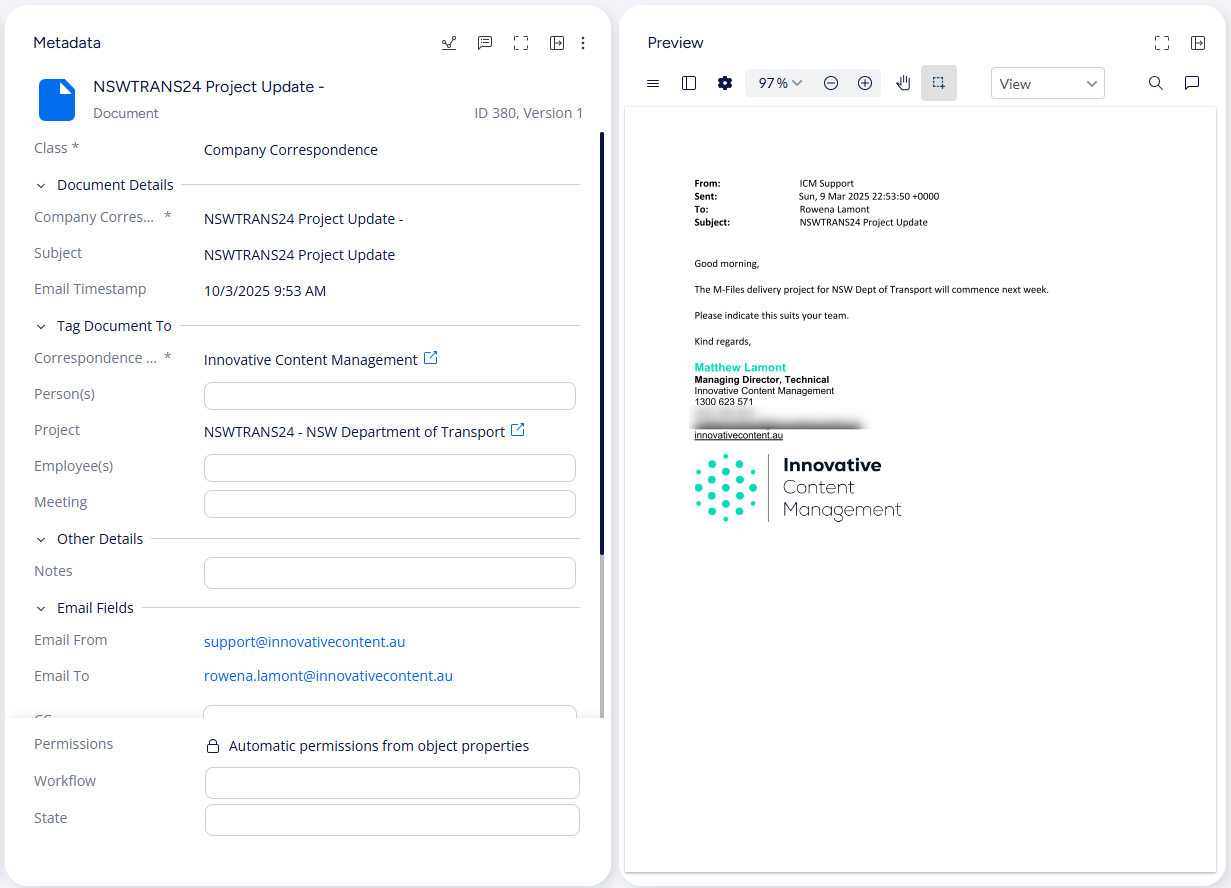
Fortunately, a more intelligent approach to managing and securing vital business communications exists: M-Files, a powerful information management platform, offers a far superior alternative to relying on email as a primary storage and management solution. M-Files provides seamless integration with the familiar Microsoft Outlook interface, enabling users to effortlessly save important emails directly into a secure, centralised vault.
The strength of M-Files lies in its metadata-driven organisation. Instead of relying on complex and often confusing folder structures, users can tag emails with relevant metadata such as client name, project number, document type, or date. This rich metadata significantly enhances information retrieval through powerful search functionalities, ensuring that the right information can be located quickly and easily, regardless of who sent or received the email.
Furthermore,
metadata can be used to
automatically assign permissions to saved emails, ensuring that only authorised individuals have access to sensitive correspondence based on the document's context.
M-Files for Outlook Pro: The next generation email management tool
Released in early 2025, M-Files for Outlook Pro is now a crucial component of M-Files’ integration with Outlook, offering advanced capabilities for automating the filing of correspondence and other important emails. It assists with metadata application and manages email chains effectively.
Users can easily save emails and their attachments to M-Files with a single click or through customisable Outlook folder rules, eliminating manual effort and potential tagging errors. M-Files for Outlook Pro:
- Allows for effortless email organisation with one-click filing directly from Outlook to M-Files.
- Automates conversation saving after an initial email has been saved from Outlook to M-Files, automatically saving subsequent replies back-and-forth on email chains to M-Files.
- Enables users to easily apply metadata, save attachments, and automate filing with customisable Outlook folder rules, all within the familiar Outlook interface.
- Provides visual indicators to instantly identify and access filed emails, ensuring no email is misplaced.
- Supports filing from shared or delegated folders, enabling seamless collaboration across teams.
Enhancing external collaboration with M-Files Hubshare
The security risks of sharing confidential information via email should not be overlooked. For organisations that frequently collaborate with external partners and clients on confidential documents, M-Files Hubshare provides an essential additional layer of security and control. Instead of attaching sensitive files to emails, which can be intercepted or forwarded without authorisation, Hubshare allows you to share documents through secure, branded web portals with granular permission settings.
Hubshare ensures that external collaborators only have access to the specific information they need, significantly mitigating the security risks associated with traditional email sharing. Hubshare streamlines content sharing directly from your M-Files vault, ensuring that shared content remains current and prevents data duplication. Read more in our blog post on M-Files Hubshare.
Regain control of your organisation's email management with M-Files
Transitioning from an email-centric information management approach to a robust M-Files solution can significantly enhance your organisation's productivity, security, and compliance. For expert guidance in implementing and tailoring an M-Files solution to meet your specific needs, chat with the team at Innovative Content Management.
As an experienced M-Files Delivery Partner, we are well-placed to help your organisation streamline email management and improve information governance. Stop letting your inbox be a source of chaos and risk – embrace the intelligent information management capabilities of M-Files.
More Articles



Share